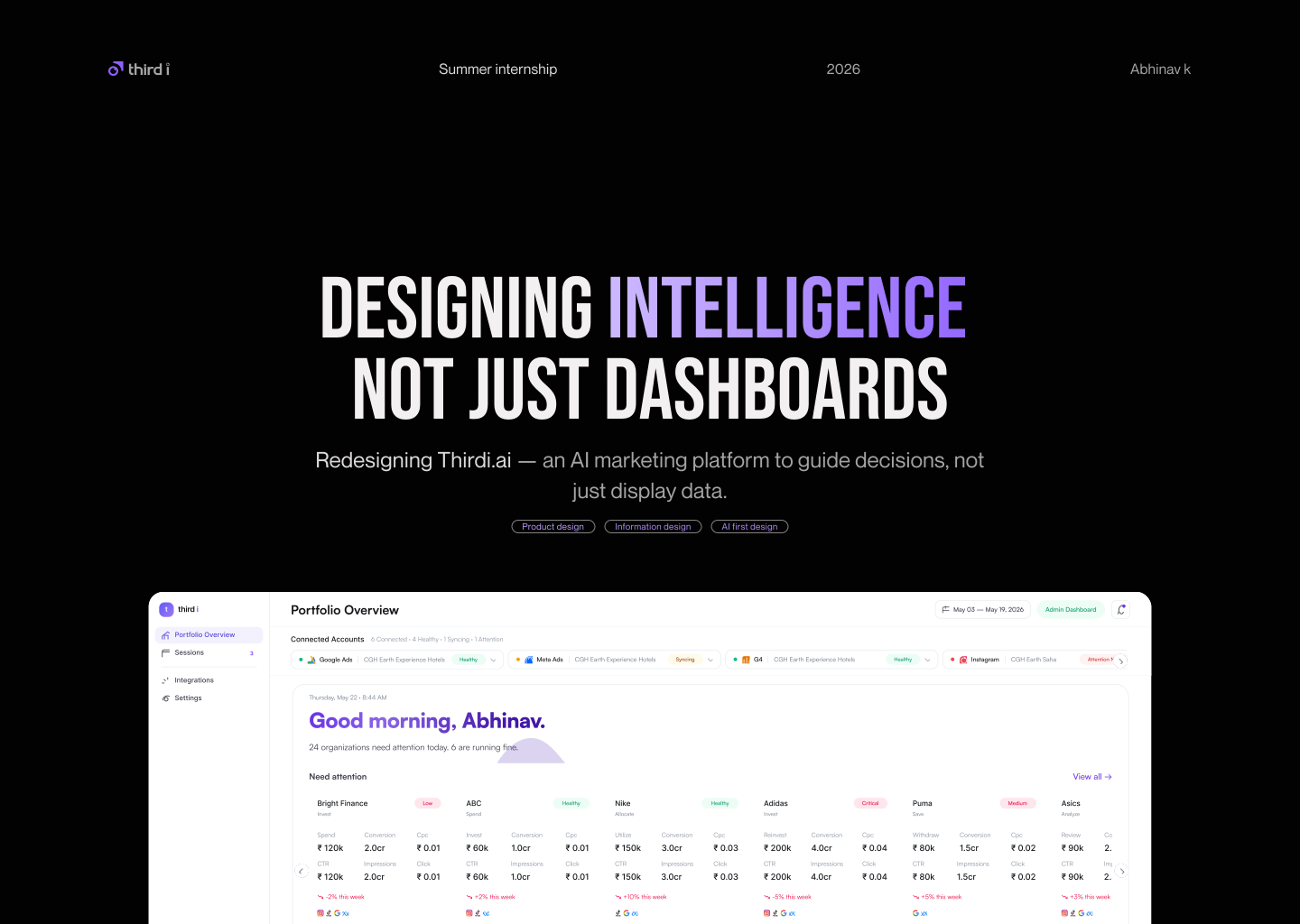


The problem
The product showed data.
It never showed meaning.
The work was never about the screens.
It was about the decisions the screens make possible.

Decide
Decides the next actions based on insights. Notes, shares with team or applies changes in ad planforms
~ 5-10 mnt

Interpret
Reads AI insights, recommendations and performance summaries. Tries to understand the “why” behind the numbers
~ 5-10 mnt

Correlate
Connects the dots across campaigns, creatives, keywords and audiences to find root cause and relationships
~ 3-5 mnt
"Show me the data. I'll figure out the rest."
"Just tell me what to do."

Find data
Searches for specific campaigns, ad sets, keywords, or metrics. Opens relevant reports and drills down to the right level
~ 8 mnt

Navigate
Explores the main modules and familiarizes with the dashboard layout and key sections
~ 2 mnt

Setup and connect
Connect marketing platform using Gmail. Grant permission and verifies all accounts. Confirm successful data sync across channel
~ 5 -10 mnt
Confusion
Normal
Frustration
ROAS
Revenue
Agency User
CPC
Customer
CTR
Budget
CPL
Sales
Impression
SMB Owners
Two Users, One Broken System

Interpret
Reads AI insights, recommendations and performance summaries. Tries to understand the “why” behind the numbers
~ 8-15 mnt

Compare
Compare metrics across time periods, platforms, campaigns or audiences. Identifies trends, changes and performance gaps.
~ 5-15 mnt
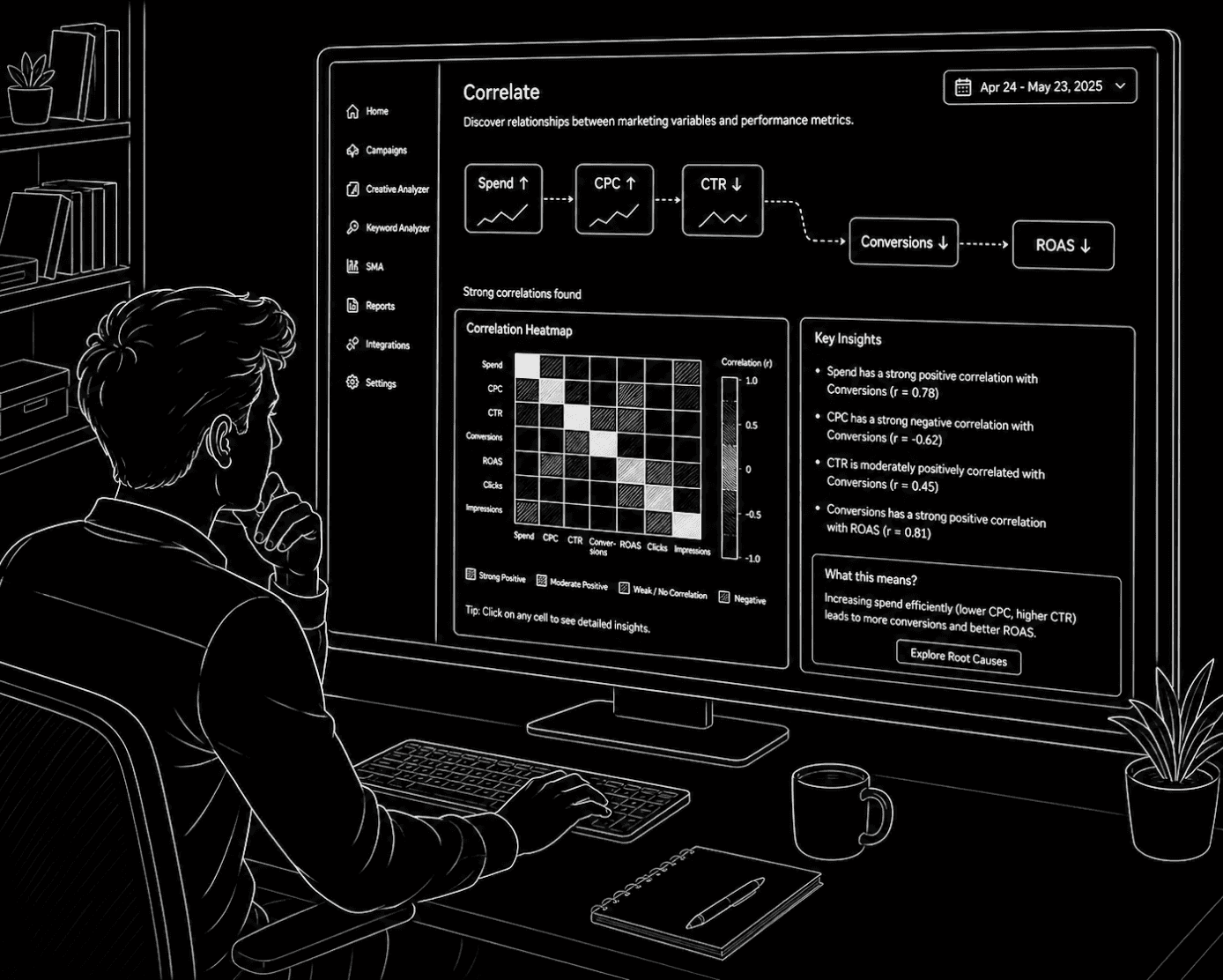
Correlate
Connects the dots across campaigns, creatives, keywords and audiences to find root cause and relationships
~ 5-12 mnt

Decide
Decides the next actions based on insights. Notes, shares with team or applies changes in ad planforms
~ 10-15 mnt


Anomaly 01
Account connection
Currently client need to go integration page and connect their Gmail account . once user connected all account ,user need to go to user management page and assign organization without having any guide.
Current process
Logic
Options
Final
Problem


From the platform integration page user need to move to “Manage organizations” tab
Thrn user need to select “manage ad accounts” tab and choose add accounts to assign to organization one by one
From the platform integration page user need to move to “Settings” tab to assign organizations
Current process is time consuming as well as confusing.
Now users can see what's happening when they connect their account, without having to go to two completely different screens to assign it.


Designed flow
Same time user can see what will happen once they connected the account to platform. No guessing. no confusion
Now you can just drag and drop respected organization ad account to the box

Just need to connect account in every platform
Just need to go to integration page. you will get all connection details in this page itself
Also user will get clear cut direction in this screen itself
Now user can see available account connected to the each platform. user can select/filter the account if they want


Technical language problem
The current experience exposes CPC, CTR, CPM, ROAS, CPA.Metrics don't speak the language of business outcomes.
No clear “Why”
The product shows what changed, but not why it changed.
Analytics-first experience
Users navigate Homepage → Campaign Funnel → Creative Analyzer → Keyword Analyzer → Social Analyzer. This creates exploration-heavy workflows, cognitive overload, and slow decision-making.
Hidden intelligence, AI insights are buried across different tabs.
Anomaly 02
First thing you see should be the
only thing that matters right now
Thirdi.ai is currently positioned as a centralized marketing analytics platform. The experience is analytics-driven — dashboards, charts, analyzers, KPIs. The user still performs most of the cognitive work: identifying problems, connecting insights, interpreting metrics, prioritizing attention, deciding actions
5 problems to solve
Five root problems exist in the current product that the reframing must solve:
Two user types. One system
The same product must speak differently depending on who is looking. The system must know which user it is addressing before writing a single word.
No operational continuity
Recommendations don't connect to what happened next outcome
Root cause aggregation
This is one of the most important product principles. The system must not expose 15 disconnected alerts. It must synthesize low-level signals into one understandable root cause.
Hierarchical intelligence architecture
Information must be organized hierarchically. This prevents overload, fragmented understanding, and scattered attention. Users understand business impact first, then drill deeper only when necessary.
Technical metrics stay inside the Growth Session for diagnosis. The Morning Brief surface always speaks in business language first.
The system checks three categories of root cause before concluding:
User is overwhelmed. No clear action.
User understands the problem but not the cause.
User understands what happened and why.
CPC up 34%
Root cause aggregation
CTR down 18%
Bounce rate high
ROAS down
Bad — Metric
Better — Behavioral
Best — Business
CPC increased 34%
People interacting less, making campaigns more expensive.
You’re paying ₹3,200 more this week for the same customers.
CTR declined 18%
People are clicking less on your ads.
Users may be losing interest in the first few seconds of your ad.
Bounce rate increased
Users leave without completing a purchase.
People are arriving on your page and walking straight out.
ROAS declined to 1.5x
Ad spend returning less revenue.
Every ₹1 you spent last week returned ₹1.50 — down from ₹2.20
Bad — Raw signal
Better — Behavioral
Best — business cause
CTR down
CPC up
ROAS down
Bounce rate high
Frequency 6.1
People interacting less, making campaigns more expensive.
Users may be losing interest during the first few seconds of your ads, causing acquisition efficiency to decline.
How did i reach the solution?
Signal to business language
The most important translation the system makes is converting technical signals into behavioral intelligence. This is the difference between a dashboard and an operating partner.


Metrics are design tool for system, not communication tool for users
We finalized it screen by screen, ensuring that each stage requires user input to proceed, which gives users the sense that they are in control and aware of what's happening
Logic
Option 1 - Long scrolling
Option 2 - Screen by screen - Final
Problem

CPC
CTR
CPM
CVR
New feature
Morning Brief
The Morning Brief is the homepage AI operational briefing layer. It is not a dashboard widget. It is a business intelligence narrative delivered every morning before the user asks for anything.
“The Morning Brief should feel calm, intelligent, and operational. Like someone who knows your business is talking to you before your day starts.”

Active Tracking — collapsed by default
Approved sessions are tracked here without interrupting the morning.
Check day 3, 7, or 14 progress anytime.
The three-layer model
Below Active Tracking is the Morning Brief card, every Morning Brief card is built from three layers. Each layer is one sentence. Together they tell the complete story.

Not enough signal state
The system must not always sound certain. A fourth confidence state is added for when data is too young to conclude anything.
Before — always certain
Only three states: High, Medium, Ruled Out. System surfaces issues even with 24 hours of data.
After — honest about signal
Four states: High, Medium, Ruled Out, Not enough signal.
< 3 days → do not surface
3–5 days → 'not enough signal'
5+ days → High / Medium / Ruled Out

Normal period
Business Outcome
You're spending ₹3,200 more this week for the same number of enquiries.
Business Situation
People are clicking, landing on your page, and leaving in seconds
AI Summary
The ads aren’t the problem — something breaks after the click.
New campaign just launched
Business Outcome
Your video ads are pulling than anything ....
Business Situation
Anew audience is responding- and your...
AI Summary
The right move is to put more behind it

The product
Growth Session
An AI workspace built around one business problem—bringing together analysis, evidence, diagnosis, recommendations, execution, and tracking in one focused flow.. It is not a static dashboard page or a chatbot window.
“The workspace assembles itself around the active problem. When the session ends, it returns to the Morning Brief. The user never has to navigate.”

Evidence
The evidence section pulls the relevant problem-related data into a dedicated section and then shows what actually happened in the backend.
Diagnose
The Diagnose section shows why something happened, ranked by confidence. It looks across all connected data sources - not just ad platforms. This is where Thirdi earns trust.
Recommend
Specific actions with projected business impact. Written in plain language. Each recommendation connects directly to the root cause found in Diagnose. Also system always check budget constraints or risk appetite before recommending.
Budget check
This recommendation requires ₹8,000/week. Your current cap is ₹5,000. Adjust your budget or choose the lighter action below.
Risk check
This changes your core campaign structure. Confidence is high — but if you prefer, we can run a smaller test first before full execution.
Outcome tracking
After execution the system immediately begins tracking whether the approved actions worked. This is shown as a 14-day timeline. Three outcome states are now designed.

Ends with a concise single business insight.
Rephrase the problem with a question for the user engagement
System find out the major reason of performance drop
Combines metric, comparison, trend, and AI explanation within a single evidence card
Root causes ranked by confidence with text and chart format for better understanding
Displaying the key signals analyzed by the system to establish trust with the user
Conclusion in a business
insight format
System ask permission to proceed
Approve and execute
When the user reaches Approve they see all recommended actions with four options: Edit, Reject, Save without executing, Approve and execute. The system never acts without permission
Generate pdf to sent respected authority
Iteration
Single screen
Codi inside the growth session
Guided action plan with budget consideration
Codi open by default with possible questions from user
Split screen comparison view give freedom to user to select the action plan
User can see the budget differences in both plan
provision to share the action plan with your college

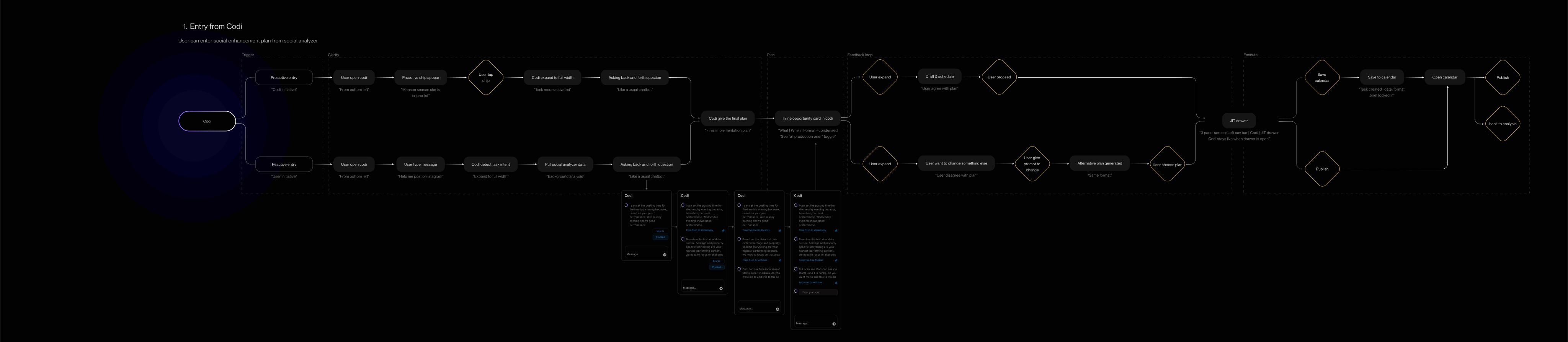

Social research workflow
Will create opportunity card from the competitor analysis
Dynamic Product Ad
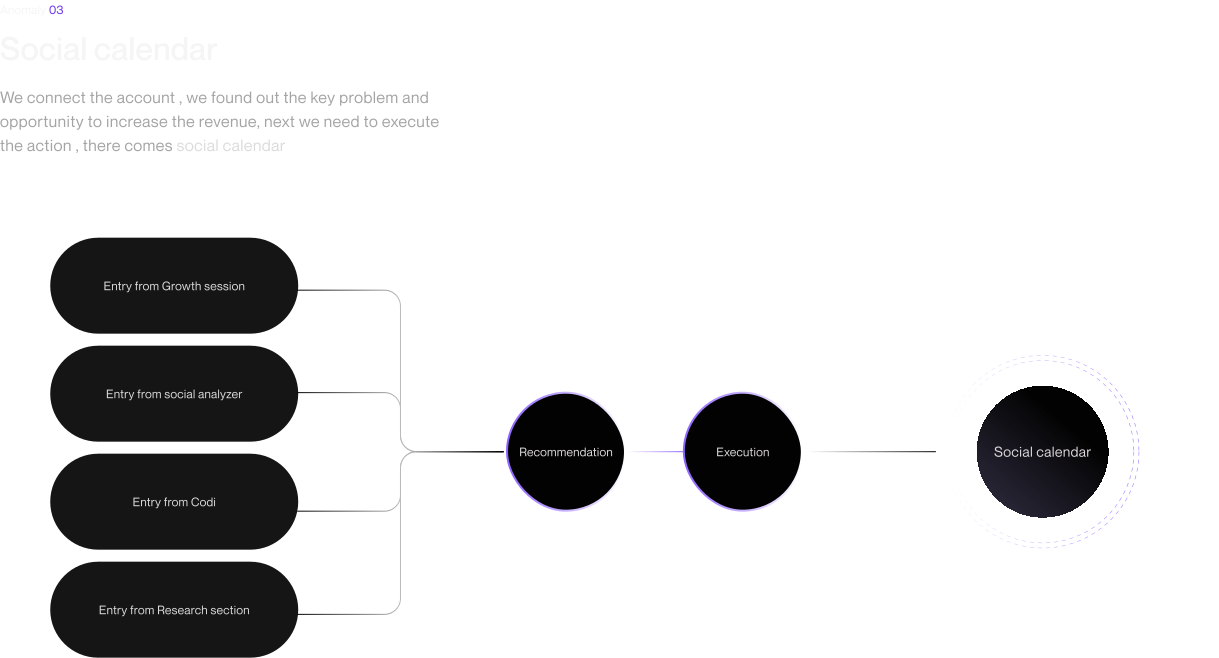
Social calendar
So users can execute their creatives from the Social Calendar, acting as the last junction in Third i, where they can view both past and upcoming creatives created from different sources
Users can see what happened to their creative through the status chip in the top-right corner
Time frame chip
Statues chip
Content heath info
Portfolio overview
When users open the Third i dashboard, they will first see the Portfolio Overview page, where they can view the overall performance of all their organizations.

Priority badge
Both card and table view
Connected accounts
Edge cases


Whom should we ask for permission?
Only one account can connect

My Battle field

People i worked with
I had an incredible time working with Anand, Aravind, Vimal
and Vishal and still miss the rest of the team.

Anand
Founder

Vimal
Product engineer

Aravind
Senior data engineer

Mohit
CTO

Vishal
Performance marketer
My Learnings at Third i
Design with a clear purpose. Every element should help users understand, decide, or act—not just make the interface look polished.
Design for real workflows, not ideal ones. I learned to understand how marketers and agency teams actually work before designing the experience around them
Think AI-first, not AI-added. I learned to design AI as part of the core product experience—not simply as a feature added on top. The goal is to let AI interpret complexity, surface what matters, and help users make better decisions
Turn complexity into clarity. Working with large amounts of marketing data taught me that good design is often about simplifying complex systems without hiding the information users need
Data needs the right story. Metrics like CTR, CPC, conversions, and ROAS are useful individually, but their real value comes from showing how they connect and what they mean for the business.
Ask more, understand better. The more you ask, the clearer the problem becomes

Thank you